There’s a lot of talk about the shortcomings of LLMs. They don’t actually reason. They’re expensive, especially when running in a loop. They’re quite slow at doing things.
There’s a narrow category of use cases that LLMs excel at, one of which is “sifting through the noise”. The noise is everything we have to process to get to what we really want.
Here are some use cases I haven’t heard about that I’ve enjoyed as a software engineer.
Searching through Customer Conversations
A PM colleague uploaded the transcript of every call with our top customers into an Embedding DB. Now their product proposals are deeply backed by evidence. We know 40% of our top customers have mentioned this pain point. The PM also identified a list of eager private beta customers to try out our new feature.
This is useful when the customer’s problem is abstract. Often, these issues don’t have clear solutions, or those solutions don’t have clear names. That makes filing Feature Requests hard, and organizing/deduping even harder. Before LLMs, your best bet was that someone on your team had enough tenure to have seen this come up enough times, and that they remembered how to find all the links and connections. Now, it’s RAG.
Going from endpoint alert -> log analysis
Any large system is going to be operating most of the time in failure mode.
When I’m on-call, one of my responsibilities is to triage failures on API endpoint our team owns. These failures are reported as “high rate of HTTP 4XX/5XX”. Sometimes, it’s noise, like there’s a DB connection hiccup for the pod. Other times, it’s signaling a bug, like customers can’t delete something anymore.
Triaging is tedious:
The first step is searching for the canonical log lines that mark the specific endpoint with the specific HTTP failure, filtered by time.
Once I find the request that triggered the alert, I search by request ID, to see the request from start to end. Based on the logs, and my source code, I can usually guess what went wrong.
Sometimes the stack trace is compiled JavaScript, rather than Typescript, so the line numbers don’t line up. I have to guess based on the name of the next function call.
I double-check that I’m looking at a representative request. I quickly look at two or three more request IDs to make sure they’re all the same root cause.
For more difficult issues like DB connection timeouts, I’ll see if there’s clustering on the canonical log lines around timestamp, host machine, customer ID. Maybe it’s not specifically my route, but an infra issue.
All in all, there’s a lot of stuff to sift through. There’s so much judgment required, and I haven’t even found the problem, let alone thought about a solution yet.
Yet, an agent harness is almost perfect for this. Given some alert and timestamp, point me in the right direction: logs, source code, or clustering. This has cut my triaging time from 15+ minutes to 1-2 minutes per issue. You don’t even need the SotA ($$$$) models. Save your money, use a faster model.
I published this workflow as a skill for my teammates with the intention of sharing the actual human skill involved. The output names all the queries it tried, categorized into informative or non-informative, with links to dig deeper. I don’t want it to be magical, because I want my teammates to know how to think about triaging. I also want it to be a ramp to independent discovery.
Shortening Content
I specifically didn’t call this summarizing because:
ChatGPT doesn’t summarise. When I asked ChatGPT to summarise this text, it instead shortened the text.
But despite all that, I still find incredible value in shortening texts! I’ll sometimes get recommended a podcast or video that’s over 1 hour long. Sometimes, I’m hooked within the first 5 minutes. But for technical content, my interest is often buried deep in the video, maybe 30 minutes in for recorded talks. I don’t want to spend that much time figuring out if something is interesting to me, and LLMs greatly help with that.
Okay, shortening is really useful to me, but how do I get it to work on videos and podcasts? I made myself a little automation that, given a link, will check:
If there are subtitles, download that
If it’s a video, download the audio for transcribing
If it’s audio, transcribe
Once I transform slow video or audio formats into text, I can summarize!
I say all this with the caveat that maybe this is a coping skill for my ADHD. Attention is hard for me to maintain, specifically for audio. I literally have a test result saying I’m in the bottom 1% for auditory focus, consistency, AND stamina. These are three separate skills, and I’m statistically awful at all of them. So maybe what matters the most is the ability to transform audio into text, since I’m able to process text much better than audio (though statistically still average).
Filtering Recruiter Spam
I get between 1-4 emails per day from “recruiters” or their Agents. It’s quite annoying. They’ll come on weekends, overnight, holidays.
So I set up an automation that reads my emails every 15 minutes and classifies them as recruiter or not. If it’s recruiter, mark it as read and label it.
Something small like this has cut down on my email maintenance significantly.
Sometimes I go through them and try to unsubscribe, but often it’s just personal email spam, not a true mailing list subscription.
In the past, I’d reply saying I’m not looking for work right now, but the sheer quantity of emails makes me feel like no human will ever actually look at my responses. Just another LLM.
Instagram Video Search
This is a dream of mine, but I want to index every video I’ve hearted on Instagram. I want to OCR the subtitles on the screen, transcribe the audio from the video, and object-detect from the thumbnails. I want this because it’s so damn hard to find that one video I liked from 3 years ago. It’s just floating around somewhere in the internet, on Instagram or TikTok. I have no idea how to find it. But I think embeddings can.
Sure, Google wants to “organize the world’s information”. I appreciate that I can search “horse” on the Apple Photos app and get all the horses I’ve seen. But I want it for my memes, and I’m shocked at how behind Instagram is on this.
Closing
That’s all I got.
I’m still very on the fence about LLMs. I enjoy using my open-weight models. I’m excited to see work on making inference affordable. And I’m terrified of their impact on our economy, social fabric, and individual psyche. But I got some fun goodies out of it.
Yes, the planet got destroyed. But for a beautiful moment in time we created a lot of value for shareholders.
A few weeks ago, I changed my Slack channel sections. I’m now more responsive and engaged, while also feeling less stressed. How? By sorting my Slack channels by urgency, or how often I want to read them.
What
Projects
Team
Alerts
Sibling Teams
Announcements
SF Office
Social
Noisy
Versus
How Often
Read Now
Read Hourly
Read Daily
Read Whenever
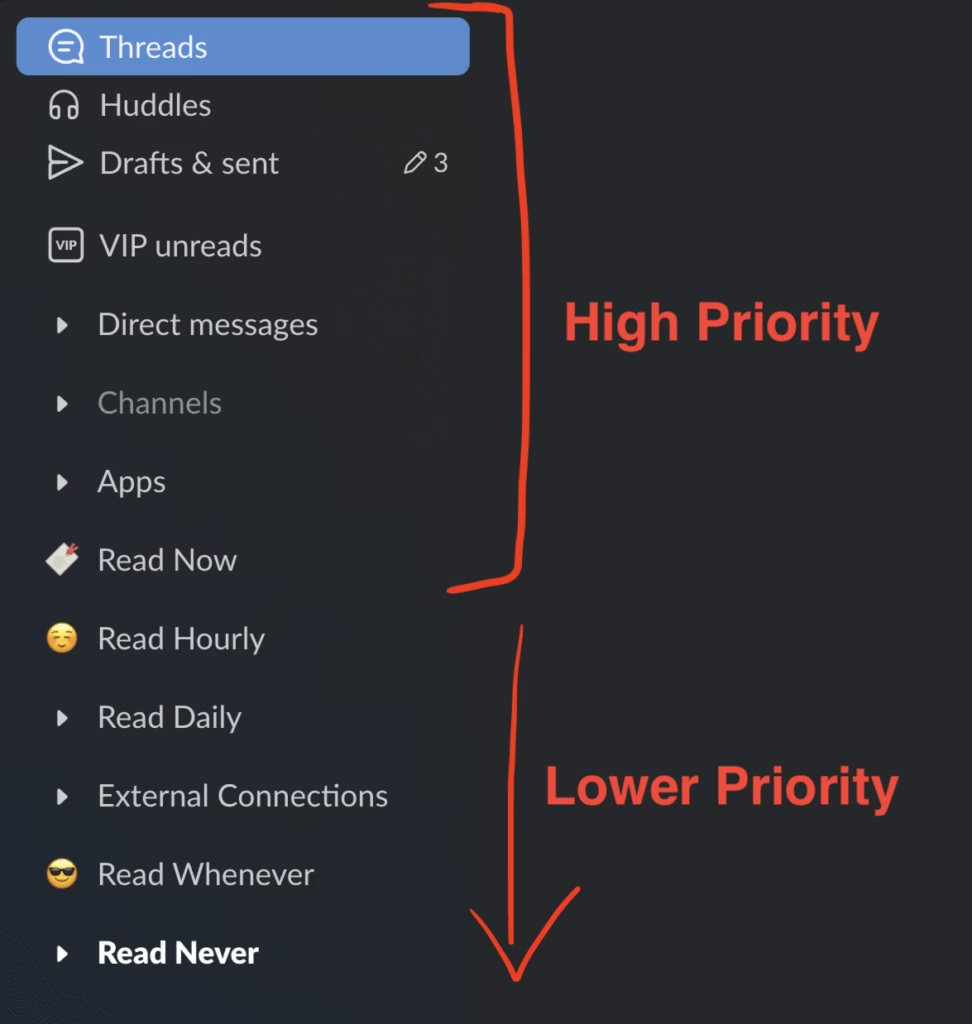
Sorting by “how often” lets me read my most urgent messages first, focusing my energy on what matters to me. Once I feel tired, I stop reading. By focusing on my most urgent and important channels, I hold confidence that I have already taken care of what I need to, reducing my stress.
A screenshot of my Slack sections. The top consists of my “high priority” sections like Read Now, Threads, DMs, and new channels. I go through my unreads from top to bottom until I am tired or I’m done.
By framing a channel’s importance through the Eisenhower Matrix, I focus on how I contribute to channels.
Urgent
Not Urgent
Important
Read Now / Read Hourly
I directly answer questions, engage in conversations frequently, or react to them in the real world
Read Whenever
I read announcements and keep up-to-date with changes
Not Important
Read Daily
I can push the conversation along by forwarding it to different channels or tagging more appropriate people
Read Never
Reading these channels is meaningless, but I sometimes write to them, so it’s annoying to leave.
This framework is flexible. Your needs and availability will change. Projects go from active development to finished. Social channels go through ups and downs. As these changes happen, you can slide the channel between any category, and it’ll still make sense.
Misprioritized channels are a source of burnout. Noisy channels in important sections waste time and hide the valuable signal. Important channels in noisy sections are missed opportunities. It’s clearest when you think of some sections like Office, Social, and Project. Intuitively, Project is important. Office is important, but maybe not? Social is less important, but I still want to live a happy life. Yet, I kept finding examples that don’t fit.
Read Now — cupcakes get eaten fast, crosswords and photos are organized within 15-30 minutes
#sf-it-helpdesk
Office – Low/Medium Priority
Read Never — It’s never worthwhile for me to read this channel, but I write to them sometimes.
Project channels that I’m an active contributor to
Project – High Priority
Read Hourly — I’m often answering questions to unblock other people
Project channels where I’m a passive contributor to
Project – High Priority
Read Daily or Read — I want to stay on top of announcements and changes, but I’m not actively contributing
I conclude that organizing by “what” is pointless.
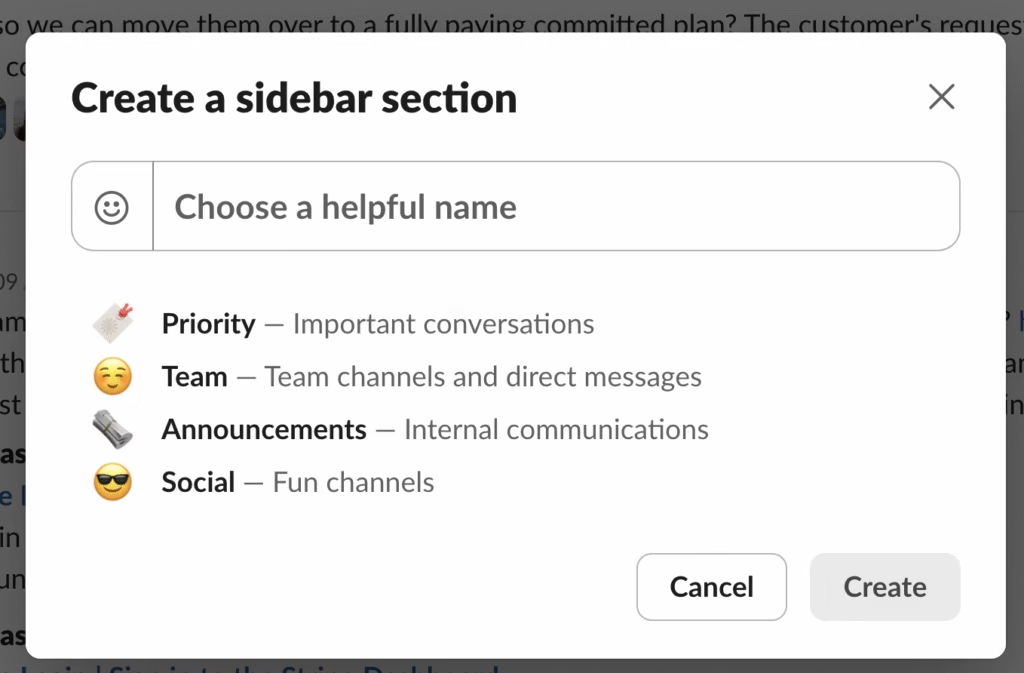
Why do we organize by “what”? I think because, by default, Slack suggests Priority, Team, Announcements, and Social, priming us for “what”.
It’s easy to categorize by “what”. It’s easy to explain, and it’s easy to have icons. But I don’t find it useful.
How did I start categorizing by “how often”? Is a channel high or medium priority? Just guess. Your gut instinct is probably right. In the worst case, you’re wrong and you slide it up or down. If you’re deeply unsure, put it into Read Hourly or Read Now first. You’ll quickly know if it was the wrong decision. After a couple of wasted moments, slide them down a level. Repeat until the channel stops bothering you.
I’ve been organizing my Slack by “how often” for almost a month now, and have successfully maintained Inbox Zero for Slack every day. Give it a shot!
Today, I’m sharing my recipe tracking app powered by machine learning, how it works, and some things I struggled with (mostly Next.js).
Okay, okay. Yes, I’m also tired of the industry shoving AI/ML into every product that has no business doing any AI/ML. It’s like blockchains and NFTs all over again, but with way more money, promise, and fantasy.
BUT HEAR ME OUT! For the last few months, I’ve been working on a new app to revolutionize how I store and search my recipes using some basic machine learning techniques. It’s got one monthly active user (me) and generates a profit of -$12/mo. Customer satisfaction is through the roof! But enough of my success story, let me share why I even started this project.
All those notes live in a single 55MB, 117 page long Google Doc. I didn’t intend to make a monster. I just wanted to science up my cooking! Jokes aside, I take a bunch of notes whenever I cook and I’ve become a lot more adventurous and consistent because of it! I write down all my modifications and how well it turned out. Sometimes, just eating my food inspires me; “oh, I should try potato starch next time!” But my ADHD also means I filled my doc full of recipes I will never cook. They’re just there for inspiration. This has lead to a huge growth in my doc and now it’s falling apart.
Unfortunately, I’ve outgrown this doc. It sucks in a lot of ways. It crashes if I try to search on my phone. It’s so damn long that my eyes glaze over trying to read even the recipe names.
Google Docs crashes as soon as I try to search for anything…
So I made a web app that uses some Machine Learning ideas to organize my recipes, supporting fancy search, and improving discoverability. Along the way, I learned Next.js which feels really popular on reddit so I’ll share some of my thoughts on that.
I’m a noob at ML/AI so I’ll share my definitions that are likely somewhat wrong:
embedding – a vector of numbers representing something. For example, in word2vec, vec is the embedding representing the word.
feature extraction – taking some thing and making an embedding out of it. For example, in word2vec, the process of applying word2vec on a word to get a vector/embedding is the feature extraction. You can think of it as extracting the important “features” out of some input and getting something that represents the important bits.
Cool things you can do with embeddings:
In some embedding spaces like word2vec, you can add them together and get resulting vectors that make sense: king + woman = queen.
There are surprisingly simple ways of combining vectors / embeddings like averaging or adding.
Check out this visualization of my recipes! It flattens the 384 dimensional vector into 2 dimensions using UMAP (versus PCA or t-SNE). Try searching “eggplant” or “rice” and you’ll find things are pretty localized. Zoom in and you’ll likely find some surprisingly good clusters. On the other hand, there are some bad examples, like ramen, pasta, and spaghetti are not related at all.
I want a front page where everything is a bit different. Diversity is important! A random list of recipes is more inspiring.
What I currently have is awful. I read table of contents for my doc and it’s a huge wall of text, where my eyes glaze over immediately. It’s always in the same order. At one point, I grouped related recipes together, but that actually breaks my “inspiration” use case because I’ll have 20 recipes in a row about making rice or tacos, and everything else is chronological because I was too lazy to organize all 300+ recipes.
Video of me scrolling through the table of contents for my doc. It’s a huge wall of blue text. Nothing to focus on.
I tried out Paprika but it seems more focused on organizing your recipes and meal-planning rather than exploring. There’s no “random” section.
Finally, I just feel bored looking at these things. It’s nearing Thanksgiving and every recipe website is showing me 20 ways to roast a turkey. PaprikaApp just shows me sorted by last added date.
BudgetBytes shows their top Thanksgiving Recipes. Seasonal, fun, but not really my jam when I’m making things day-to-day.
So I made a random front page! When you go to my list of recipes, the app randomizes all my recipes, every time. Don’t like what you see? Refresh!
Still don’t like it? Try searching for something (and see the next section)!
Searching and Organizing Recipes
Existing platforms do a poor job on searching and organizing recipes.
In PaprikaApp, you can organize your recipes into categories and folders but it’s completely manual. Also, I’ve never found a good method for categorizing recipes. Some people do it by primary ingredient (beef, chicken, bean) but I feel like I should just search for that ingredient and the recipes should just show up. Also, what happens when I am more okay with substituting ingredients? Or when a commenter tried a recipe with beef instead of chicken and it was great? Maybe I’m searching for “shrimp” but the recipe I want says “prawns”. I personally need something much more flexible.
On AllRecipes.com, you lose a bunch of “potato” recipes when you search “potatoes”.
On websites like AllRecipes, you can search all the recipes in the world but it’s pretty strict. If I search “mashed potatoes” (plural), it’ll ignore every recipe that spells it “mashed potato” (singular). Again, I need something that is flexible.
Basic Search Implementation
I went with a super basic search implementation, where I tokenize the query into “words” and then search for each word as a substring in each recipe. Then I give each recipe a score using TF-IDF.
When searcing “bacon and eggs” (with debug mode enabled), we give more weight to “bacon” and “eggs” because those terms are more unique and rarer among recipes. “and” is a useless term because it appears in nearly every recipe, it provides no useful information about relevance. So we should show recipes that say “bacon” and “eggs” much more often!
In debug mode, you can see where the terms matched (title, notes, or linked content), how often it matched, and what score we gave to those matches based on TF-IDF. We demote “and” whereas we promote “bacon” and “eggs”
Think about TF-IDF in terms of Information Gain. Does this term meaningfully select for recipes?
Massage Typos And Related Spellings
I have lots of typos in my recipes. I spell ratatouille 3 ways. Cooking against transliterated recipes is hard too, like chow mein vs chao mian. In Peru, they say chaufa instead of chow fan. All these mean the same thing but spelled differently.
To fix typos and near-words, I calculate Levenshtein distance from the input word to all words found in my recipes. This distance measures the needed number of character changes to convert one word to another. PostgreSQL supports it natively, too!
I searched for “ratatouiee” and it suggested “ratatouille” as a similar word found within my recipes.
Levenshtein distance also handles plural words really well:
waffles <-> waffle has a distance of 1
potatoes <-> potato has a distance of 2
eggs <-> egg has a distance of 1
Notice how the singular word usually covers the plural word if you search by substring: “egg” is a substring of “eggs”, “potato” is a substring of “potatoes”. Substring search gives you more complete results and so the app should encourage substring terms.
Suggest Semantically Related Search Terms
This is where ML embeddings really take over. Say I am just exploring recipes or maybe I have a vague idea of what recipe I am looking for. Was it shrimp? Was it crawfish? I’m not sure. Did I save the recipe as noodles or pasta? Who knows. I want my app to tell me what other terms might be appropriate to search with:
pasta -> spaghetti, noodles, cheese, pizza, italian
Every time I type into this form, I generate an embedding (vector representing the word) and query for every word in my recipes for the words most closely related to my term. It seems to work pretty well!
I searched for shrimp and it found a typo: shrimo. It also suggested seafood, crawfish, lobster, crab, prawns, fish, and eel!
From here, you just click on each suggested term that you want to add. I thought about doing this automatically, so you don’t need to click, but I couldn’t really find a good threshold for what to include. Also, some very related words aren’t good to merge. I might actually be searching directly for a shrimp recipe, and not a general seafood recipe. If I want a general search, I can just click all the terms I’m okay with.
Search Through Linked Content
This was a big deal for me. This makes my recipe app SUPER worthwhile. When I drop a link to a recipe, I want to be able to search by the contents of that link.
Why is this so powerful?
Let’s say I drop a YouTube link, if I could search through the title, description, and subtitles/transcript, then I can search by what the video is about! I just need to paste a link like https://www.youtube.com/watch?v=gUlkwSHOT7Q and then search “congee”.
Other times, I’ll search for “kale” and a suprising recipe comes up because someone commented that the recipe “works great with kale”.
Including linked content allows me to be a lot more creative about what I can cook because it’s a lot more fuzzy.
This was kind of tricky to implement. I had to extract the links out of the content I save on my website, then I submit them to a personal instance of ArchiveBox, when archiving finishes, ArchiveBox posts to a webhook callback on my web app and my web app pulls the archive information (transcripts, htmltotext.txt, etc) and puts that into the database for searching. I also need to regenerate embeddings whenever this happens. But, it works!
Related Recipes Should Float Together
Say I’m looking at my recipe for “InstantPot White Rice“. My app should tell me other recipes that are similar:
Stove Top White Rice
InstantPot White Rice
Oven Fried Rice
InstantPot Brown Rice
Mango Sticky Rice
Kimchi Fried Rice
All these recipes are somewhat related to each other, either because they’re white rice recipes, or derived from white rice. Other times, recipes might be related by cooking type or a special ingredient.
With embeddings, you can actually see all the “rice” recipes clustered in the bottom right, near korean-kimbab and other Asian recipes.
So what I did was for each recipe, just show all the recipes that have the “closest” embedding to them.
I’m looking at the “Sea Bass a la Michelle” by Chef John from FoodWishes.com and my app recommends: baked fish, steamed fish, crab cerviche tostada, sea bass and fish sauce fried rice, shrimp, and peruvian tuna salad.
I cut out a bunch of stuff because I don’t need the features. My app works good enough! None-the-less, they still seem like good ideas, just not worth the effort anymore.
OCR for Image Searchability
Sometimes I take a picture of a recipe in a book, or someone sends me a hand-written recipe. It’d be nice if I could search for the text in images that I’ve uploaded.
This turned out to be more difficult than I thought it would be. Word embeddings are super easy. You shove words into a model and it spits out embeddings. OCR models seem trained either on hand-writing or text, so you have to use both models to handle both cases. It does seem like the Donut model can handle both. But these models specialize single-line text, so you need to submit images cropped to a single line or word, which requires another model.
Alternatively, I could use tessaract.js which seems a little slow but could work well since I’m already using Node and feature extraction is usually a background job. The more popular, recommended, and efficient option is PaddleOCR but that requires python.
Label images using AI
I wish I could just upload pictures of recipes I’ve cooked and then I could search “peppers” or “broccoli” to find the recipe.
Next.js really got in the way here. With limited runtime allocated to free tier and no native background job support, I just couldn’t justify spending so much time implementing something I don’t really need. I’ve only uploaded like 4 photos to my recipes. Everything is possible with more time but this feature was more cool than useful.
Combine TF-IDF With Embedding Pooling
I’m currently using a BERT model with average pooling, which averages the embeddings of each token (or word) to generate one for the sentence. In my case, I concatenate all the sentences from the title, notes, and linked content to make one super long sentence and then I get a pooled average embedding for that to represent the whole recipe. Every word is equal weight in this average.
I already weigh the recipe name and the words I write more heavily than the linked content, mostly because linked content can be a little spammy. If I also use TF-IDF, then the embeddings for “saffron” would weigh more heavily than “and” or “cook”. I think this would give me much more interesting results, but I also find really good results with what I currently have.
Sort front page of inspiration by maximum distance between recipe embeddings
This would give more diversity in the semantic meaning of the items. For example, “Fried Rice” shows up first on the list. Don’t show related recipes like “White Rice”, “Fried Noodles”, or “Coconut Rice” until later down the list. Showing them together is less inspiring and diverse.
I used ArchiveBox for link content extraction, but one weird situation is that it uses multiple methods so if I concatenate them all, I might get duplicate results which weighs it heavier. However, I need to consider all the extraction methods because some work better than others for specific content. For example, DOM dumps of YouTube are basically useless, but yt-dlp output is super valuable.
Next.js, was it worth it?
As part of this endevour, I decided to pick up Next.js and with it, Tailwind CSS and React. TLDR: I wouldn’t do it again specifically because of Next.js. It just feels like a very young framework with no batteries included. I think I’d stick to Django for the backend, but use Tailwind CSS and React (or Svelte) for the frontend. IDK, web dev is kind of a mess.
Pros – Benefits of Next.js
The development flow is really cool. I can make a commit on a branch and they’ll have a subdomain pointing to a deploy of that branch. Push auto-deploys in seconds (or however long your builds take). You can easily push a change and get a domain to test against very easily. It’s really interesting!
Server Actions are really interesting. You basically don’t need to build out an API at all. It auto-generates endpoints for whatever functions you mark as “server actions” and it creates an HTTP based RPC call from the client side to that function. Feature building becomes really really easy because you don’t have to think super hard about what API form you want and how to lock it down (CSRF, auth, etc). It just does. The ergonomics are really good too, you just put the function handle as the “action” in your form or whatever and it’ll do the right thing.
Biphasic programming with Server Side Rendering (SSR) is a new-ish React feature, not specific to Next.js, but is super interesting nonetheless. You can write a component as either server- or client-side and they can mix-and-match throughout the tree. A server component can access server resources like databases, internal APIs, and server hardware without restrictions. A client component can access all client APIs and maintain client state info like clicks, typing, input, filesystem for better interactivity. All of this happens pretty transparently!
Edge runtime is kind of a cool concept, to run specific parts of your app like routing at edge to speed things up.
Partial Pre-Rendering (PPR) is cool too, to pre-render and statically generate as much of the page as possible, until you encounter dynamic code. I honestly don’t know if the speedup is good, but the concept is cool.
Cons – My Struggles with Next.js
6 second request timeouts on Vercel’s platform means I can’t do longer-running tasks in a straight-forward manner. This pushed me to self-host.
If you self-host, you lose like half of the pros, unless you use OpenNext. Most of all, you lose the cool development flow. The caching and edge runtime is kind of whatever to me.
Next.js implemented Middleware hella weirdly. They crippled middleware by forcing only one single middleware ever. It runs in the very restricted Edge Runtime (no db access). There is no opt out.
Auth is hella weird. I tried to use auth.js which is Next.js’ official auth solution. Middleware mid-ness really holds back auth. You can work around this by using an oauth service, but you can’t have any of your users, roles, or permissions stored in your personal database. A third party auth service MUST handle scoping and permissions too.
Invaliding caches is really manual and you need it often. What would be better? Declaring reactivity behind caches and data sources. It’s exhausting to invalidate all the caches for all the things you need. In a complex app, you’ll inevitably miss a spot and the app will just behave strangely. Next.js caches pretty much everything so it’s something you’ll run into and have to think about pretty quickly. No, reactive caches aren’t a thing AFAIK, but it sounds good, right?
No indicators for when links are loading or forms are submitting. When you submit forms or click links, the browser shows indicators that it’s in progress. Since Next.JS pushes EVERYTHING into JS, there are no indicators. The linter aggressively pushes the Next.js Link component. Prefetching is nice if you’re on a powerful machine but it gives no indication when you click, it’s just a slow page. Submitting forms? Gotta implement your own indicator too because it’s just a stuck page for like 1 second.
Feel free to ask me any questions and I’ll try my best to answer.
Special shoutout to transformers.js, which allowed me to run machine learning models in Javascript in the browser and in Node on the server. Crazy how far we’ve come.
Are you hiring?
Context: I’m looking for a job. I built this app as part of my year away from capitalism. Airtable laid me off in September 2023 (14 months ago) and spent that time taking art classes, teaching nutrition to elementary school kids, building all the side-projects and personal apps that I’ve been itching to work on, and some traveling. However, capitalism is a reality of my life and I need to pay rent.
About me: I’m a generalist software engineer, 10 years into my career, primarily experienced in backend python and javascript/typescript. I have some light experience with frontend dev so you can consider me a backend-leaning fullstack engineer. I love building things and digging through layers. If you’re looking for someone to gain deep expertise in some system, or someone to understand how systems fit together, I’m your person. I’ve worked from operating systems up to client apps and I know a lot about a lot of stuff. I’m someone who loves learning! I’ve worked at companies with 25 employees, up to Apple with 15k+ engineers.
About you: I am staying in San Francisco so either you’re local or you’re okay with remote work. My other preferences are flexible but they fall along:
Small-ish with fewer than 500 employees but more than 10
Works in AI-ish stuff
Has cool people working on stuff
Encourages wearing many hats or supports team changes or working cross functionally
I tend to value cash compensation and liquid stocks over private equity
Start work in January or you’re okay with me taking all of December off
If this sounds like a decent match, reach out to m.hire.rx[at]href.cat or drop a comment here or wherever I posted this and I’ll be in touch! I might reply in January depending on how my personal life flows.
So today, I got an email from Google saying they are unable to index my pages because of 5XX errors.
An email from Google’s Search Console says: “New reasons preventing your page from being indexed. Server error (5xx).”
When I visit my blog, it looks bad.
Web server is returning an unknown error. Error code 520
My initial guess is that maybe my server is down, so I check out cpanel to see resources and server logs. Both are really low or empty. This suggests I’m not actually getting any requests from Cloudflare!
After contacting both Cloudflare and my hosting provider GreenGeeks for help, I figured out that the server’s IP address had changed recently and is leading to these problems.
Updating my DNS records no Cloudflare to point to the new IP address fixed the immediate issue. I asked if it’d be possible to have my DNS records updated automatically if the IP address changed in the future and they said no. I’m thinking this is a “pro” feature and I’m just gonna move on with my life.
To catch this in the future, I’m keeping detailed records of my changes (like which IP address I’m using) and subscribing to UptimeRobot so I can be notified. Check out my new status page (also at the top of my website)!
I switched my CDN provider from QUIC.cloud to Cloudflare. Why? Because quic.cloud kept erroring out on me.
Blank 403 Forbidden from openresty403 Forbidden from QUIC.cloud
Very suddenly around May 14 2024, I started receiving HTTP 403 Forbidden when visiting my blog. After lots of trial and error, I found that it really only stopped when I “Bypassed CDN” entirely. No amount of disabling security checks or allowing my IP and User-Agent would fix the issue.
I did discover a few things:
My tablet, phone, and laptop would all encounter the error at different times on different refreshes, on different browsers, on different internet connections, and even in incognito. This gave me a very strong feeling that it was not actually permissions related.
Running through CURL with verbose, I noticed some headers that suggest I’m assigned two different POPs and only one of the two returns the 403 Forbidden error.
The headers on a 403 were very bare, so it likely wasn’t from wordpress or my server.
So I switched to Cloudflare. I thought about trying other CDNs but none of the other ones had good free tiers or had a way to lock down specific pages from bots. I found bots to be quite annoying on my website, trying to take it down by resetting passwords aggressively or by leaving waves and waves of comments. While I don’t like supporting mega companies, they really are a decent choice in the current ecosystem.
As I’m learning color theory, techniques with acrylic, and practicing mixing real paints, I wanted a way to practice mixing neutrals and more complex colors to match what I see. I found this fun little website game!
California just rolled out their new Money Network pre-paid debit card. Deposits after Feb 14th will be issued to that card. I received mine on Feb 13th, but ran into a few issues.
There’s an EDD specific website
There’s a weirdly branded website that’s the first result on Google, but when I try to log in, it just refreshes the page over and over again. Turns out this is the WRONG website!
This is confusing because you use the general Money Market app, not an EDD specific one, so why is there an EDD specific website and phone number?
Deposit notifications don’t work
I even tried to set up notifications of deposits into my account but never got an email after my Unemployment Insurance deposit. Support says the first deposit might not notify, but it should work on later deposits.
The phone number in the app doesn’t work for my card
In the app, they say to call 1 (888) 913-0900 for support.
However, when I call it and give my card number, it’s not supported. Same thing for if I enter my social security number and date of birth.
“We are unable to process your request.”
Instead, call 1 (800) 684-7051 which is the specific number for EDD, listed on the back of the card. Warning, the support is pretty mid and disappointing.
Unable to transfer to my bank account
When I try to initiate a transfer to my personal bank account, I usually pick the smallest amount I can find to make sure I got the account number and routing number right first.
When I tried with $1, which was listed as the minimum, I got “Invalid Withdrawl Amount”.
It’s unclear from the app, but on the website, it specifically says: “ACH TRANSFERS REQUIRE A $25 MINIMUM TRANSFER.“
MONEY NETWORK BATCH REJE – Money Network rejected my transfer to my personal bank account.
Automatic transfers can only be setup through the website and is janky
With the old Bank of America card, you could set it up to automatically transfer the card balance whenever there’s a deposit. This was super convenient because I’d just use my normal bank’s debit card for all my purchases and have my Unemployment Insurance transferred there instead.
With the Money Network App, they don’t have an option to automatically transfer. You HAVE to use the website. From Dashboard > Transfers > Schedule Transfers.
The flow is weird though and I haven’t been able to figure out how to get it to accept. I think you just need to enter random values for deposit amount (then check the entire balance box) and the end date (then check the never end box).
When a homeless man attacked a former city official, footage of the onslaught became a rallying cry. Then came another video, and another—and the story turned inside out.
After migrating my blog to a new host, I noticed my website would crawl to a halt while I clicked around. I would see hangs ranging from 4 seconds to 15 seconds. If I click enough, I’d eventually see HTTP 503 Service Unavailable. Why was visiting my website causing it to hang? Here’s my debugging story.
It was strange. In my previous post, I shared some tests measuring my website’s response times and the numbers were beautifully performant. Yet, I was seeing and feeling something very different. CURL would return within one second, but my real-world experience was terrible. So what was the difference?
At first, I just assumed that it was because I’m on a shared instance and something was going on with my host. Maybe they were getting DDOSed or another website on the host was using too many resources. After contacting support, they told me I was occasionally running up to my CPU and memory limits.
My first thought was: “that’s really weird”. I’m pretty much the only user of my own blog, so why am I already hitting resource issues? Was a search engine crawling my website eating up all my resources? Was someone DDOS’ing me? How was I able to send so many CURL requests successfully but fail after clicking a few links?
After playing around with my website a bunch, I realized I could only trigger this failure from Firefox on my iPhone. It won’t reproduce in Chrome or Safari on the same phone. It won’t reproduce on any browser including Firefox on my Mac.
I loaded up the access and error logs to see what’s going on. What I found in the error logs was A LOT of requests to apple-touch-icon.png and apple-touch-icon-precomposed.png. All of these returned HTTP 404 Not Found. These are favicon alternatives on iPhone for home page stuff. I hadn’t set a site icon yet, so they were correctly erroring out. I suspect what this blog post suggests: WordPress spends a lot of time processing 404s. I believe this is something core to WordPress because this occurs even when I disable all my plugins. Either way, when I set my site’s icon, I no longer get the CPU run-up from. Problem solved. 🙂
But wait, there’s more!
While investigating this, I dug into my raw access logs and found each time I loaded a page, I was making almost 60 requests to my server! I made nearly a thousand requests in a minute by just clicking around my website.
I decided to break down the requests.
64% were to /favicon.ico, /apple-touch-icon.png, or /apple-touch-icon-precomposed.png which either resulted in HTTP 200 with zero bytes, or HTTP 404 because I didn’t have a site icon set.
22% were to static content (CSS, pictures, etc) which seemed pretty normal.
7% was for the original page, also pretty normal.
For every page load, I’m requesting some form of the site icon 15 times. But why?
Who’s asking?
Digging at the user-agents for the favicon.ico and apple touch icon requests shows 90% come from the user-agent “com.apple.WebKit.Networking/8614.2.9.0.10 CFNetwork/1399 Darwin/22.1.0” rather than Firefox. Not super helpful. This is the default NSURLSession user-agent for WebKit, the default web view producer.
I also noticed a weird user-agent that appears in 23% of all my requests: Mozilla/5.0 (Macintosh; Intel Mac OS X 10_11_1) AppleWebKit/601.2.4 (KHTML, like Gecko) Version/9.0.1 Safari/601.2.4 facebookexternalhit/1.1 Facebot Twitterbot/1.0
Specifically, I noticed it’s facebot, Facebook’s Messenger preview generator but also weirdly twitterbot. That particular user-agent seems to make 25% of all requests to my blog. It seems to be an internet crawler, but the IP address for the request is coming from my device? I guess it’s client side, but what client is triggering that? Surely not Firefox, the privacy-oriented browser. After Googling for some tie, I didn’t find anything suggesting that that was the case. But I don’t have anything Facebook related embedded in my website either, so where was this coming from?
At this point, I kind of wonder if it’s a syncing thing. When I open the page on my phone, maybe Firefox also opens it on my laptop and that triggers a flood of requests for the site icons that didn’t exist. Or maybe my device is syncing to Firefox servers? But the requests are coming from my device, so this probably is not server related. Or maybe it’s because I have other open tabs and it’s refreshing all the favicons?
One weird thought I had was maybe my adblocker is preventing me from reproducing this on my Mac. I was wrong, but it was easy to check.
I decided to disconnect from Wi-Fi on my phone so that I can isolate which requests are coming from my iPhone versus my MacBook. If it’s syncing, I’m not sure who is making which request and the user agents really are not helping. Since they’re connected to the same Wi-Fi access point, their public IP will be the same. If I drop to cellular data, I’ll get my cell carriers IP address instead, which I can check with https://whatsmyipaddress.com.
So who is making all these requests? Definitely my iPhone.
I still don’t get how this all ties together. Why is a Facebook web crawler meant to generate the metadata in Messenger links querying my website when I visit it in Firefox while syncing is enabled? Why is twitter involved?
So What Triggers It?
I decided to make a list of actions that might be triggering this bug and do them with a 45 second gap in between so I can isolate the logs easier.
Open Firefox
Make a new tab
Type aggressivelyparaphrasing.me into the URL bar
Open my site
Refresh
Sync tabs
Close tabs
Turns out, every one of these actions triggers the flood of requests. That’s right, opening and closing my tabs triggers a flood of requests to my website. As long as my website is open in any tab, opening or closing any other tab will trigger a flood. This made me suspect that other websites are also getting this flood of requests whenever I do anything in Firefox.
Another thing I realized is that after these actions, about 8 seconds later, a larger flood of requests come in. I believe this is the background sync for tabs, but that’s just a guess.
I think this is a good example of where filing a bug is super helpful. You can see here that I was really struggling to figure out what was going on. Other people are probably struggling too and experiencing the same thing but worse because their websites are so much more popular. For me, I lucked out because I could super easily isolate my traffic and reproduce this with my own device on demand. Others will just see their error and access logs. Maybe they’ll be able to guess the right keywords and the issue will rise to the top, but I think it’s esoteric enough that this would be hard to come by. Filing a bug just get’s us closer to sharing the knowledge that this is a problem. Filing a bug helps people centralize on where the problem is and show impact. It gives people a place to say “I’m not alone”.
Why all the computing?
At some point along the way, I started asking myself, why is my site unable to handle all these repeated requests? Why is my CPU spiking and eventually becoming unavailable when a client requests a missing favicon.ico 40+ times?
At first, I thought it might have been something specific to 404. I decided to install some tools to help me investigate. code-profiler can breakdown time spent on a request by the plugins processing time. Xdebug is a more classical profiler that I probably would have preferred but I had trouble configuring it on my host because I don’t have access to my php.ini.
I was able to reproduce the issue with just CURL by just running the request 40 times in parallel.
for i in {1..40}; do curl https://aggressivelyparaphrasing.me/missing.ico & done
However, after profiling, testing, and measuring, I realized that a request that 404’s costs the same as an uncached request. The profiles between an uncached request and a 404 are very similar, as are the times.
The problem is that the result of a 404 is always uncached with WP Super Cache, my caching plugin. I confirmed this by checking for the header and the metadata that the cache usually provides. After looking at some of the settings, I don’t think caching 404 is configurable.
So what now?
I filed the bug, I’ve isolated the issue, it’s someone else’s code. I can’t directly address the bug, but it did expose several interesting issues with my website. In this situation, it’s important to focus on things I can do. The five why’s (pdf) is a good framework to arrive at those actions because we tend to have less control over the higher level reasons. Some say this is how you get to the “root cause” but I think every level is a root cause where mitigations should be considered. In my case, I can’t directly control things like “PHP uses a lot of CPU for requests” or “Firefox on iPhone is spamming me with requests”. Instead, here’s a list of things I did or considered doing.
I didn’t have a site icon, which meant that requests for the site icon (favicon.ico, etc) will return HTTP 404 Not Found. I addressed this by adding a site icon. This cleared up my error logs and and reduced the amount of PHP running for these requests.
The missing icon was really just a trigger of another problem: 404’s are expensive. Part of why 404’s are expensive is because they aren’t cached. I tried to configure this in my current cache but it doesn’t look like a feature. As an alternative, I decided to try the cache that my host recommends: LightSpeed Cache. Empirically, it does cache the result of a request even if it 404’s, so this should resolve any similar bug where someone somewhere is requesting the same resource over and over again even if it doesn’t exist. Success!
While this solve the current problem of missing site icons, someone could just request random pages to force 404’s and take down my site. I tried to optimize my 404 page. However, in profiling, I didn’t find any plugins I could disable cheaply enough, the best savings was about 30% of the runtime. I tried it but I didn’t feel the difference, even though it was slightly better. Network latency just made that gain too small. I felt like I needed something that would make a magnitude of a difference. I also didn’t find any code in my 404_template.php that took much time. Even making it static made little measurable difference since most of the time is spent in WordPress or plugins. In this, I considered several options but nothing seemed good enough.
The last item I’ve arrived upon is my “Shared Unlimited” hosting plan can serve maybe a dozen uncached requests per second. It still opens me to a denial-of-service attack wherein someone just requests a bunch of uncached pages, or even random pages generating 404’s. Maybe I could optimize my 404 page, pay for more serious hosting, use something other than WordPress, or use some sort of CDN like Cloudflare. But hey, this is just a hobby site. I think it’s time for me to move on.